Charts
Equity curve, daily bars and risk allocation, drawn for the period you picked.
The four charts draw the same period the report card describes. They answer the question a table cannot: not how much, but in what shape - whether a good month was steady or one lucky day, and whether the risk behind it held still.
Where to find it
Open a period from 📈 Performance, then 📈 Charts on the report card.
Each button sends its chart as a new photo message below this panel, and the panel stays
where it is. Telegram cannot turn a text message into an image, so replacing the menu would
cost you your place after every chart; instead you can tap all four and scroll back through
them. Every photo is captioned with its own name and the period, like
Daily P&L · This Month.
The 0:0 in each title is the account's internal id. Every account's charts are titled with
its own.
Equity Curve
Equity Curve ($) on the menu.
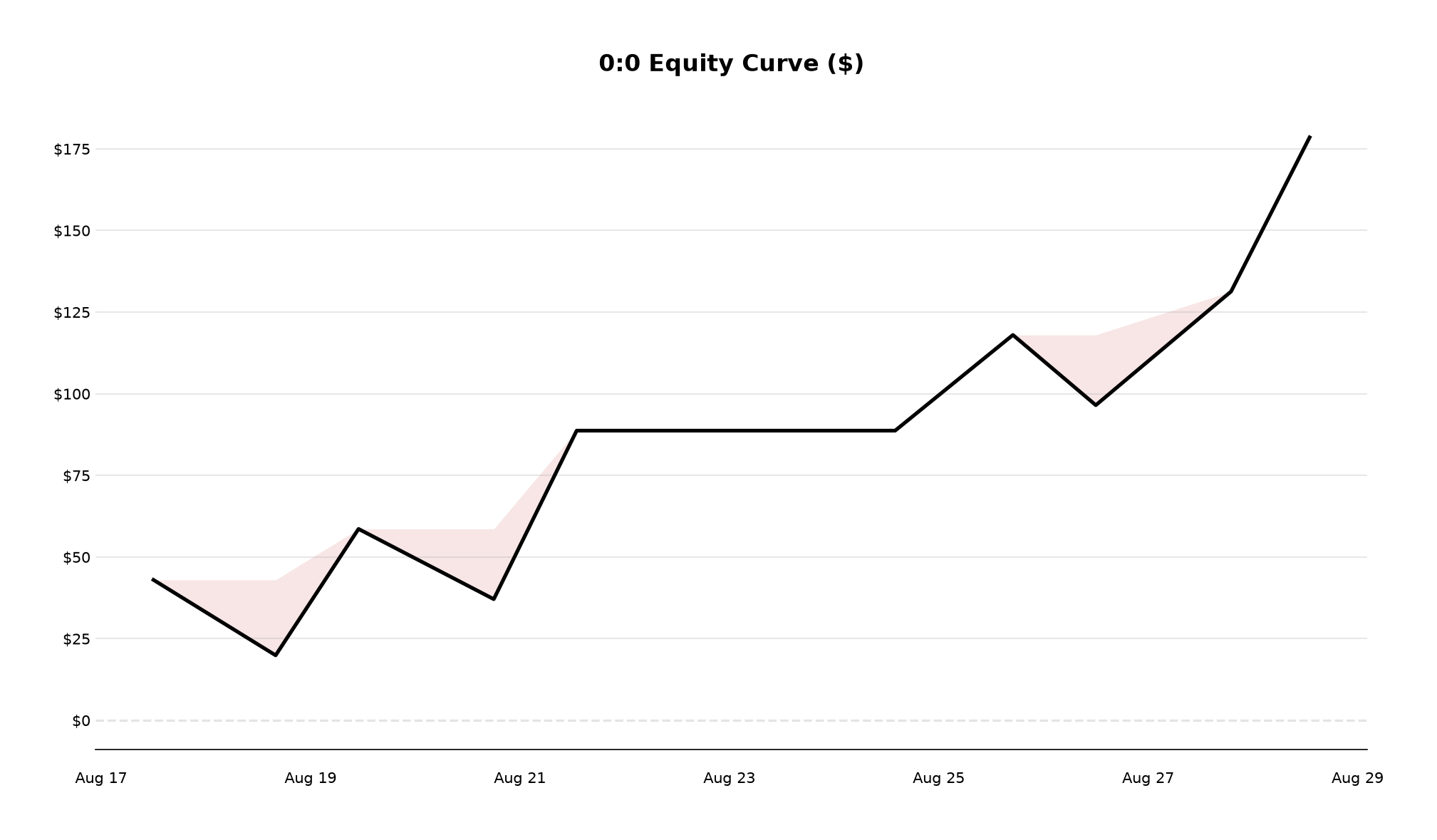
The running total of closed-trade P&L, one step per trade, in dollars. It starts at zero rather than at your balance: this is the period's own contribution, not the account's value.
The shaded area is drawdown - the distance between the curve and the highest point it had reached so far. It is the same measurement the card's 📉 Max DD row reports, drawn across the whole period instead of reduced to its worst moment, so a curve with one deep shaded valley and a curve with constant shallow shading can be told apart at a glance.
The peak is seeded at zero, so a period that opens with a loss is correctly drawn as already in drawdown rather than as a fresh high. The date axis adapts to the span: times only when every trade falls within 24 hours, date and time for a span of about a day, dates for a normal period, and months once the span passes a year.
Equity Curve in R
Equity Curve (R) on the menu. The same curve, measured in R instead of dollars - each trade steps by what it returned against the risk it was planned with, rather than by its cash result.
It exists because the dollar curve is distorted by account size. Double your balance halfway through a year and the second half of the dollar curve is steeper for reasons that have nothing to do with how you traded; in R, the two halves are directly comparable.
This is the one chart with no example above, because it needs risk-enriched trades - trades the bot placed and recorded a planned risk for. Trades without one are skipped rather than drawn as flat, and if the period has none at all the chart is refused outright:
no risk-enriched trades in this periodDaily P&L
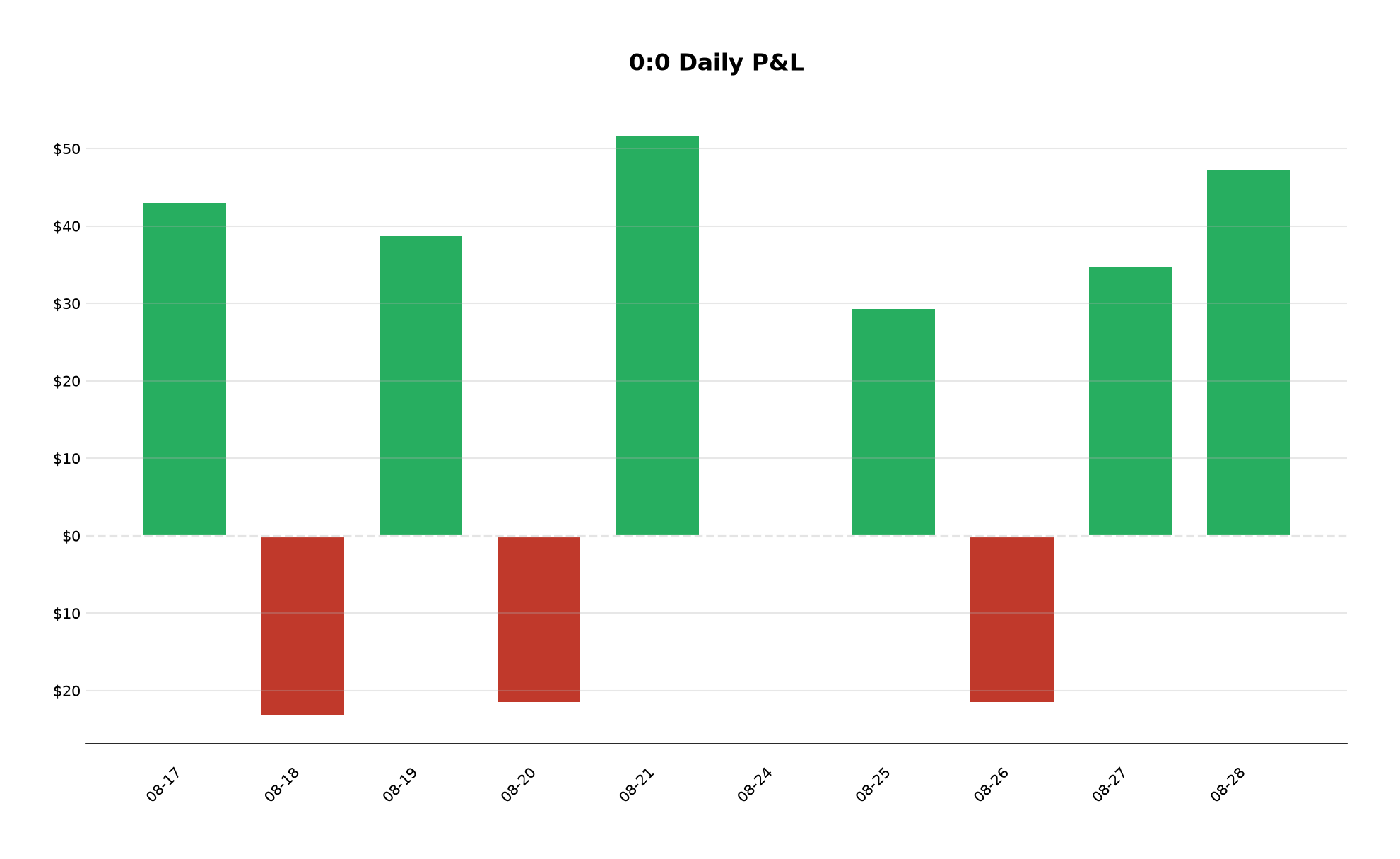
One bar per local trading day, green above the line and red below it, so a month's result can be read as a sequence rather than a total.
Days with no trades are left out entirely - there is no bar for 22 or 23 August above. That is deliberate: a zero-height bar and a day you did not trade look identical, and only one of them is a result. A day that traded to exactly breakeven does get its slot, drawn flat on the line, which is how 24 August appears here.
The axis labels carry no minus sign
Below the zero line the axis reads $10, $20 - not -$10. The side of the line and the
colour of the bar are what tell you the sign, on this chart and on the equity curve alike.
Over a long period the tick labels are thinned to keep them readable, but every bar is still drawn - a 250-day chart shows 250 bars under about 30 labels.
Risk Allocation
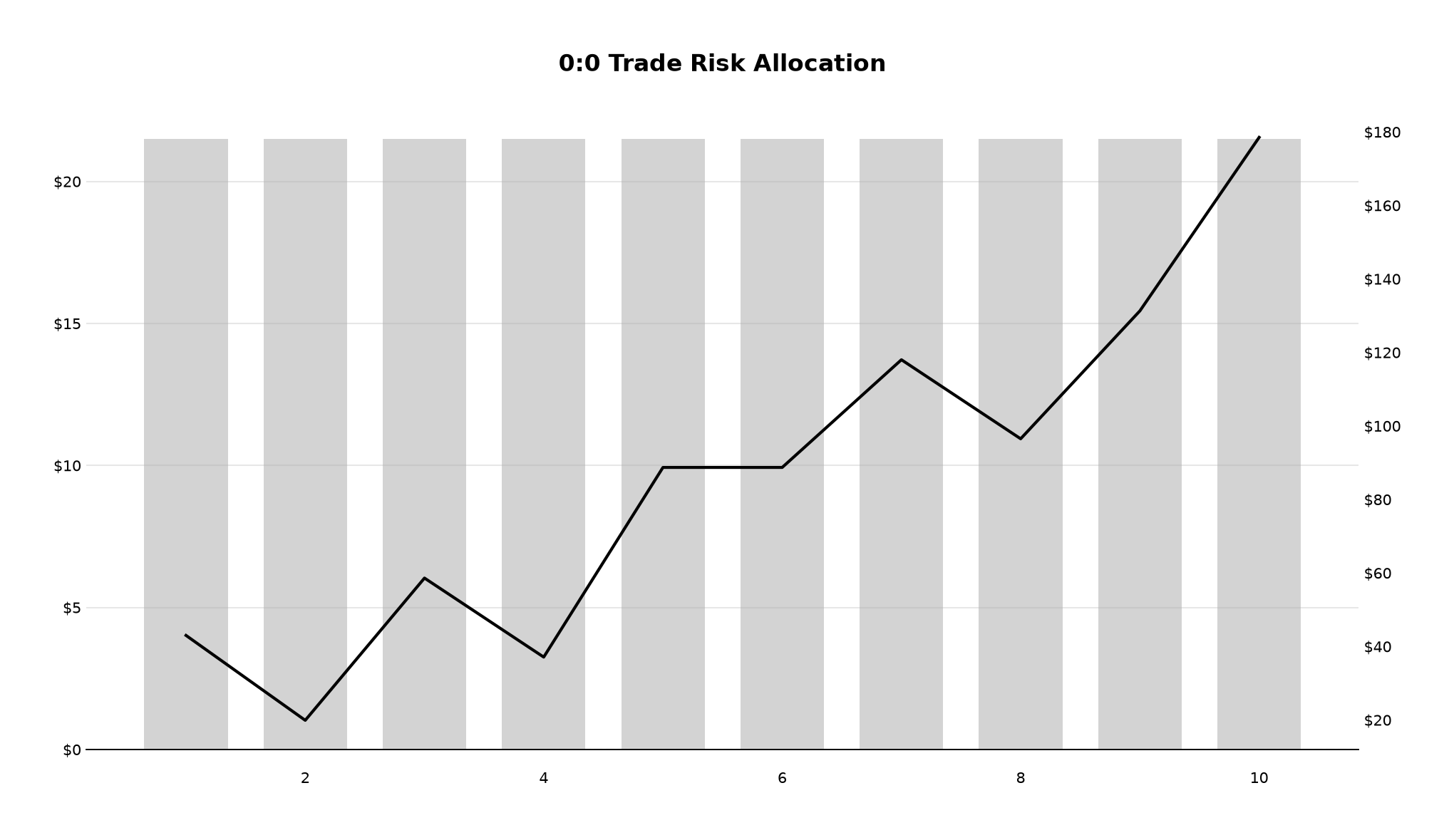
Two series on one picture. The grey bars are the planned dollar risk of each trade, read against the left axis. The black line is cumulative P&L, read against the right one. The horizontal axis is trade number in order - 1 to 10 here - not dates, so the bars stay one per trade however they were spaced in time.
This is the chart for the question "was I sizing consistently while that happened". Bars of even height under a rising line are a run that came from the trading; bars that grow with the line are an account that was pressing.
A trade with no planned risk recorded draws no bar, but still moves the line - dropping it would break the running total the line represents, so a gap in the bars is a trade the bot did not size, not a trade that did not happen.
An empty chart is refused, not drawn
Every chart needs data. Asked for one over a period with no closed trades, the bot sends a message instead of a picture:
no trades in this periodDrawing it anyway would produce a flat line at zero, and a flat line is a result - it reads as a period that traded and got nowhere, which is a different and much worse claim than having nothing to show. The R curve refuses on the same principle when the period has trades but none of them enriched.
And if the period behind the button cannot be read back at all, the reply says so rather than guessing one for you:
Could not restore that period - open Charts again and pick one below.